LM-79 Moving Detector Goniophotometer (Mirror Type C)
LSG-6000

High Precision Rotation Luminaire Goniophotometer
LSG-1890B

High Precision Rotation Luminaire Goniospectroradiometer
LSG-1890BCCD

Goniophotometer for Automotive and Signal Lamps
LSG-1950

Goniophotometer for Traffic Signal Lamps
LSG-1950S

Compact Goniophotometer
LSG-1200A

Near Field Moving Detector Goniophotometer
LSG-1900B


Select an organization
to browse standards

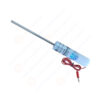
Product No: SMT-4001C
The EN 61010-1 6.2.3 Test Pin is a specialized safety tool designed for measuring, control, and laboratory equipment. It features a 4mm-diameter, 100mm-long stainless steel pin paired with an insulated cable—engineered to test the accessibility of hazardous internal parts (e.g., live terminals, exposed wiring) and verify compliance with protective enclosure requirements. The conductive pin detects electrical contact with dangerous components, while the insulated cable ensures tester safety during use. Strictly aligned with EN 61010-1 standards, it’s precise, durable, and essential for manufacturers to ensure equipment meets global safety regulations for professional and industrial use.
Specifications:
Tool Type: EN 61010-1 6.2.3 Test Pin (for hazardous part accessibility testing in measurement/control equipment)
Pin Material: Stainless steel (conductive, corrosion-resistant; maintains 4mm diameter precision under use; ensures reliable contact detection)
Cable Material: PVC-insulated copper cable (insulation resistance ≥ 100MΩ; protects against electric shock; flexible for easy maneuvering)
Key Dimensions:
– Rod length: 100 mm
– Rod diameter: 4 mm
– Handle diameter: 10 mm
– Handle length: 100 mm
Electrical Conductivity:Pin resistance ≤ 0.1Ω (ensures accurate detection of contact with live parts)
Core Function: Detects accessibility of hazardous live parts in measurement/control equipment; verifies enclosure protective performance
Test Procedures:
1. Inspect the test pin (no bent pin, damaged insulation, or poor conductivity) and connect the cable to a contact detection instrument.
2. Power on the equipment under test (EUT) and place it in normal operating mode.
3. Hold the insulated cable (avoid touching the pin) and align the pin with EUT enclosure openings (e.g., terminal slots, vent gaps).
4. Insert the pin into the opening with a steady 1N force—advance until resistance is felt or the pin is fully inserted.
5. Check the detection instrument for signals (indicating contact with hazardous live parts).
6. Record results: pass if no contact detected; fail if live part contact is confirmed.
Applications:
1. Accessibility testing of laboratory pH analyzers and spectrophotometers (per EN 61010-1:2021 Clause 6.2.3) to block live terminal access.
2. Safety checks for industrial process controllers (e.g., temperature/pressure regulators) compliant with IEC 61010-1:2021.
3. Verification of non-patient-contact medical auxiliary equipment (e.g., sample centrifuges) per UL 61010-1:2023.
4. Quality control for electrical test instruments (e.g., multimeters, oscilloscopes) during manufacturing.
5. Post-production testing of Class 2 power supplies for measurement equipment to ensure enclosure safety per global standards.
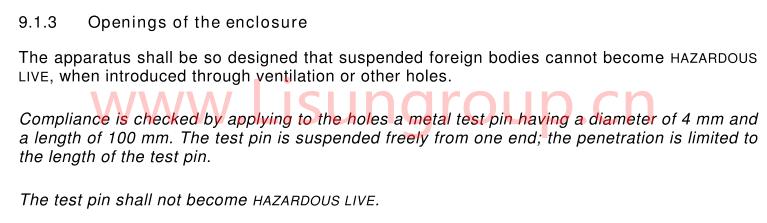
IEC 60065 9.1.3
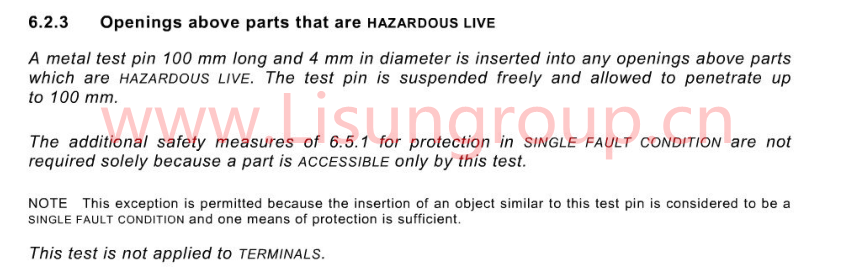
EN 61010 1 6.2.3


 English
 中文简体
中文简体 English
 Русский
 Español
 Português
 Türkçe
 العربية
 Deutsch
 Polski
 Italiano
 Français
 한국어
한국어 ไทย
ไทย Tiếng Việt
 日本語
日本語